
Shopify B2B on Every Plan: The 2026 Guide to Wholesale Without the Patchwork
By EssDeeJay Strategy Team · Updated
Shopify now offers foundational B2B capabilities on Basic, Grow and Advanced. Learn what is included, what Plus adds, and how to design the right wholesale setup.
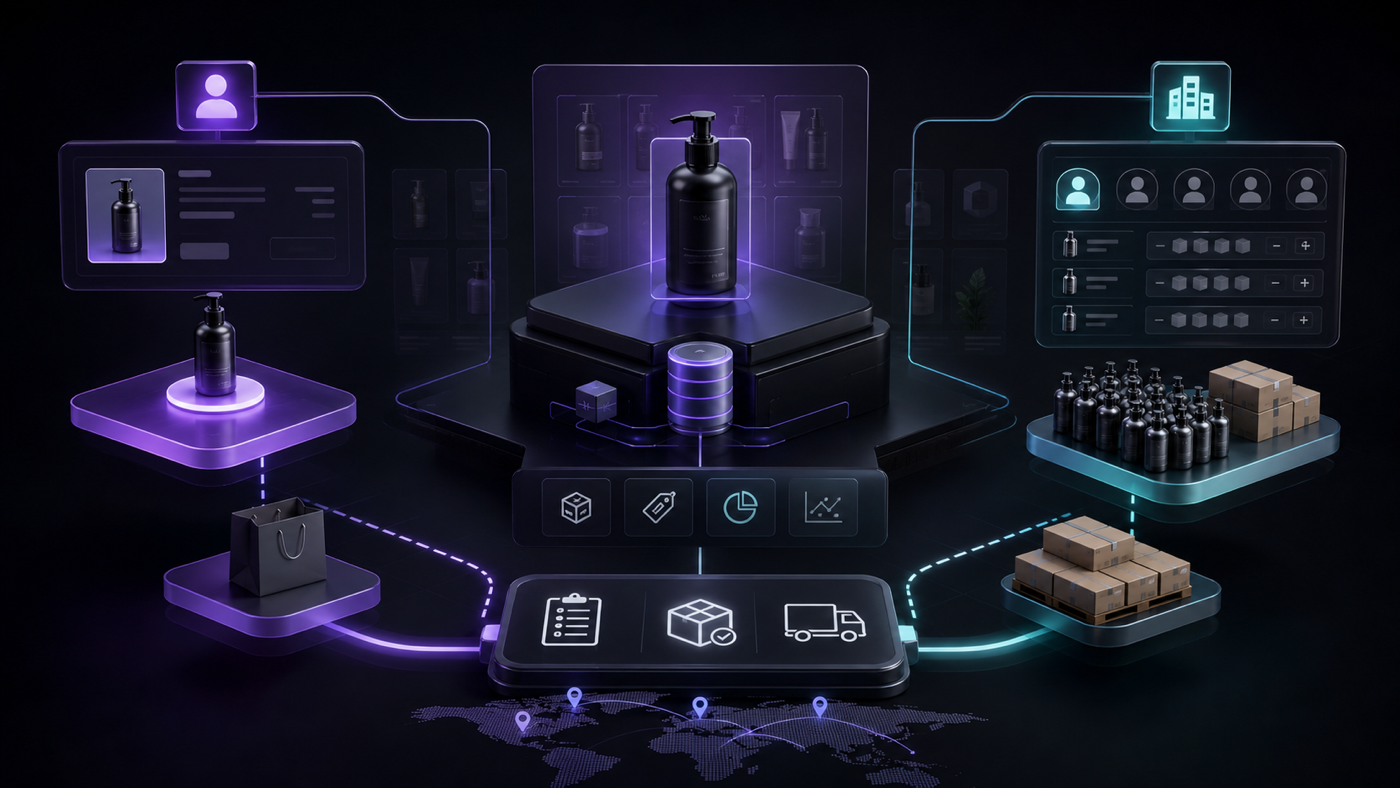
The short answer: Shopify’s foundational B2B features are now available on Basic, Grow and Advanced plans, not only Shopify Plus. Eligible merchants can manage companies, offer wholesale catalogs and pricing, set quantity rules and volume pricing, use vaulted cards and configure payment terms from the same platform that runs direct-to-consumer commerce. Shopify Plus still provides the broadest B2B capability for complex organizations.
This expansion changes the economics of wholesale experimentation. A growing brand can validate a self-serve B2B channel without immediately buying a separate wholesale platform or replatforming to Plus. It does not, however, make every implementation simple. Catalog design, customer migration, theme behavior, taxes, operations and integrations determine whether the result feels like a professional buyer portal or another workaround.
Shopify announced the rollout in April 2026 in Shopify brings native B2B features to millions more merchants. This guide translates that launch into practical decisions for brands evaluating Shopify B2B, Shopify wholesale and blended B2C/B2B commerce.
What Is Shopify B2B?
Shopify B2B is a set of native commerce capabilities for selling from one business to another. Instead of treating every buyer as an individual consumer, Shopify can associate contacts with companies and company locations. That company context can influence the catalog, price, payment terms, checkout details and account experience available to the buyer.
In practical terms, a wholesale buyer can sign in, see products and pricing intended for their business, meet quantity requirements, place an order using approved terms and return later to reorder. The merchant manages those orders alongside other Shopify orders rather than copying information between email, spreadsheets, a locked storefront and a separate invoicing tool.
Shopify’s B2B Help Center is the authoritative reference for current requirements and features. It explains that merchants can use a blended store for DTC and B2B or operate a dedicated B2B store. That architectural choice affects almost everything that follows.
What Is Included on Basic, Grow and Advanced?
Shopify says foundational B2B capability is rolling out to merchants on Basic, Grow and Advanced at no additional platform charge. The current launch includes capabilities such as:
- Company profiles for wholesale buyers.
- Up to three active B2B catalogs across B2B markets.
- Customized product availability and pricing.
- Quantity rules and volume pricing.
- Vaulted credit cards.
- Payment terms.
- A shared Shopify admin for DTC and B2B activity.
The exact availability and limitations should always be confirmed in the merchant’s admin and the current Shopify B2B features by plan documentation, because rollout status and plan capability can change.
The three-catalog limit is especially important. A catalog determines which products and prices a B2B customer can access. Shopify’s catalogs and pricing documentation states that non-Plus plans can assign up to three active catalogs across B2B markets, while Plus supports unlimited catalogs and direct catalog assignment to companies and locations.
Three catalogs can be sufficient for a business with simple segmentation—for example, Standard Wholesale, Distributor and Professional. It becomes restrictive if every account has negotiated prices, product entitlements vary heavily by market, or the sales organization needs many contract-specific assortments.
What Does Shopify Plus Still Add for B2B?
Shopify Plus remains the fit for more complex wholesale operations. Shopify highlights capabilities such as unlimited catalogs, direct assignment of catalogs to companies and company locations, partial payments and deposits. Plus can also be relevant because custom apps containing certain Shopify Function APIs and advanced checkout capabilities have plan requirements.
Do not decide based on a feature checklist alone. Compare the cost of Plus with the operational cost of forcing a complex model into three catalogs, maintaining external pricing logic, or asking sales and customer-service teams to manage exceptions manually.
A useful Plus threshold appears when one or more of these conditions are true:
- Hundreds of accounts have individually negotiated price books.
- Company locations require distinct assortments, tax treatment or payment rules.
- Deposits, partial payments or complex approval workflows are essential.
- International B2B rules vary substantially by market.
- Checkout logic requires custom Functions or extensions restricted by plan.
- The integration and governance needs justify enterprise controls and support.
For many brands, the right path is to launch a clean foundational model on an existing plan, measure adoption, and move to Plus only when complexity or volume creates a clear business case.
Blended Store or Dedicated B2B Store?
This is the highest-leverage architecture decision.
Choose a blended store when
A blended store serves DTC and B2B customers through the same Shopify store. It is often appropriate when:
- The product catalog substantially overlaps.
- Inventory and fulfillment are shared.
- The brand wants one domain and content system.
- The team wants unified analytics, merchandising and operations.
- Wholesale buyers can use a variation of the main theme.
The advantages include a single source of product truth, fewer integrations, simpler inventory and less duplicated content. The challenge is experience design. Retail shoppers need inspiration and quick checkout; B2B buyers need account context, dense product information, rapid quantity entry and reordering.
Choose a dedicated B2B store when
A separate B2B store may be better when:
- Wholesale and retail assortments barely overlap.
- Branding, navigation or content is materially different.
- The business operates distinct teams, regions or legal entities.
- B2B integrations and release schedules should be isolated.
- Retail promotions would create unacceptable wholesale confusion.
A dedicated store provides separation but duplicates work. Product changes, content, apps, analytics and theme improvements may need to be maintained twice. Inventory and customer information must still synchronize with the broader operation.
Shopify’s getting started with B2B guide recommends making the store-type decision before setup and testing the buyer experience before invitations are sent.
Design One Core With Two Intentional Experiences
Unification should happen in the data and operational layer. The customer experience should still respect how each audience buys.
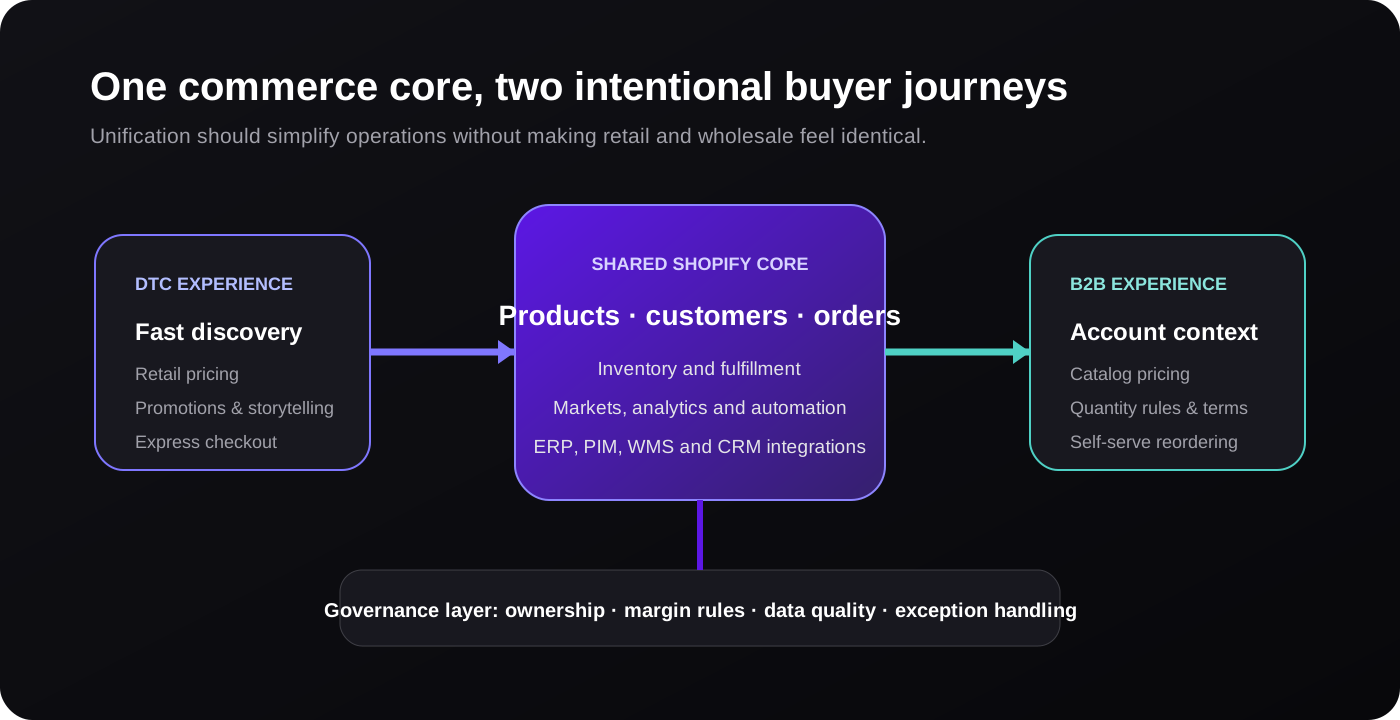
The shared core
Products, inventory, customers, orders, analytics and fulfillment should have clear ownership. Integrations with an ERP, PIM, WMS, CRM or accounting platform need a defined system of record for each field. If Shopify owns the sellable catalog but the ERP owns account credit and fulfillment status, document the direction, frequency and failure behavior of every sync.
The DTC experience
Retail shoppers often browse by lifestyle, problem or collection. They respond to storytelling, social proof, promotions and fast payment. Product pages may prioritize media, benefits and a simple quantity selector.
The B2B experience
Wholesale buyers frequently know what they need. They benefit from SKU visibility, compact product grids, case-pack information, quick order lists, availability, net pricing, purchase-order fields, account-specific terms and reorder tools. A beautiful DTC product page can be frustrating when a buyer needs to add six variants in exact quantities.
The goal is not two unrelated websites. It is a shared foundation that presents the right interaction for the buyer’s context.
Build a Catalog and Pricing Model That Can Scale
Before creating catalogs, segment accounts by a rule the organization can maintain. Good segmentation might be based on channel role, geography, volume commitment or service model. “Every customer gets a special price” is not a scalable rule; it is a collection of exceptions.
Start with a pricing hierarchy
Document pricing in a clear order:
- Base retail price.
- Catalog-level adjustment or fixed wholesale price.
- Product-specific fixed price where required.
- Volume price break.
- Eligible discount or promotion.
- Tax and market treatment.
Confirm how these layers interact in Shopify. Shopify’s quantity rules and volume pricing guide explains that quantity rules operate at the variant level and that a fixed volume price can change how other catalog adjustments apply.
Use quantity rules intentionally
Quantity rules can define increments, minimums and maximums. They should reflect real pack sizes, production constraints or commercial terms.
If a product ships in cases of 12, set the increment accordingly and show it clearly in the theme. Do not wait until checkout to tell the buyer that the quantity is invalid. Display unit, case and total prices in language that matches invoices and sales materials.
Keep the catalog count honest
With three catalogs on Basic, Grow and Advanced, avoid consuming a catalog for a temporary promotion or one unusual account unless the economics justify it. Group accounts according to durable commercial rules. If the model requires ten stable price books, that is evidence for Plus or a deliberate external pricing architecture—not a reason to hide more logic in theme code.
Plan Company and Customer Migration Carefully
B2B customer data is more complex than an email address. A useful company model may include:
- Legal and trading names.
- Company locations and shipping addresses.
- Contacts, roles and permissions.
- Catalog or market assignment.
- Payment terms and tax status.
- Purchase-order requirements.
- Sales representative ownership.
- External ERP, CRM or accounting identifiers.
Clean this data before import. Duplicate companies and outdated contacts create access and pricing risks. Define how new contacts are approved, how departed employees are removed, and who can change a shipping location or stored payment method.
Customer communication matters too. Explain why the account experience is changing, how to activate access, which historical orders will appear, how terms work and whom to contact. Invite a pilot group first. Their questions will reveal gaps in terminology, navigation and account configuration before a full rollout.
Adapt the Shopify Theme for Wholesale Buyers
Native backend capability does not guarantee a strong storefront experience. Audit every key template while signed in as representative B2B customers.
Navigation and discovery
Show only the products available to the account, but make important categories easy to scan. Consider a quick-order page with search by SKU, title or barcode. Preserve URLs and product content where possible so the store does not create unnecessary SEO duplication.
Product information
Display wholesale price, retail reference price where commercially appropriate, case pack, minimum, increment, availability and lead time. Use variant tables or multi-SKU order grids for products with many options. Buyers should not open a modal for every essential specification.
Cart feedback
Validate quantities early and explain how to fix them. Show payment terms, expected taxes, discounts and shipping assumptions clearly. For a large order, help buyers save progress or request assistance rather than losing the cart.
Accounts and reordering
The account area should make order history, company context, locations and reorder actions obvious. Test a contact who belongs to multiple company locations. Ensure the selected context persists and prices do not appear to change unpredictably.
Accessibility and performance
B2B buyers may place long orders on older office hardware or constrained networks. Avoid heavy theme scripts and inaccessible custom controls. Keyboard navigation, form labels, focus states, error summaries and responsive tables are operational features, not polish.
Integrate Operations Before Volume Arrives
A self-serve portal can increase order frequency. That is valuable only if the operation can process the orders accurately.
Map the full lifecycle:
- Account creation or approval.
- Catalog and payment-term assignment.
- Inventory and availability presentation.
- Order placement and fraud review.
- ERP or accounting synchronization.
- Allocation, fulfillment and partial shipment.
- Invoicing, capture and collections.
- Returns, credits and reordering.
For every integration, define retries, alerting and reconciliation. If an ERP rejects an order because an external company ID is missing, which team is notified and can the buyer see a useful status? Silent sync failures are more damaging in B2B because orders are larger and often tied to downstream commitments.
Shopify Flow can automate routine actions, but automation should not hide ownership. Document who approves accounts, who manages overdue terms, who updates catalogs and who resolves synchronization errors.
B2B SEO, AEO and GEO Opportunities
Wholesale buyers research online even when the final order requires an account. A Shopify B2B implementation can attract qualified traffic through content that answers operational questions with unusual specificity.
Useful keyword and answer clusters include:
- Wholesale product type plus country or region.
- Distributor, trade, professional or reseller program terms.
- Case quantity, minimum order and lead-time questions.
- Technical compatibility and specification comparisons.
- Private-label, customization or merchandising requirements.
- Shipping, tax, certificate and payment-term guidance.
Create public landing pages for the program and appropriate product categories without exposing negotiated prices. State who qualifies, typical minimums, regions served, application steps and expected response time. Link to detailed technical resources that demonstrate expertise.
For AEO and GEO, lead with direct answers, define business terms, use descriptive headings and support claims with evidence. Add Organization, Product, Article and breadcrumb structured data where it reflects visible content. A machine-readable page should still be the best human answer.
Avoid thin doorway pages for every city or industry. Build a page only when the offer, requirements or evidence genuinely differ. Quality and specificity create more durable discovery than substituting a place name into generic copy.
A Phased Shopify B2B Launch Plan
Phase 1: commercial design
- Define target account segments and revenue goals.
- Choose blended or dedicated architecture.
- Design catalog, pricing and quantity rules.
- Identify plan constraints and the Plus threshold.
- Agree on systems of record and ownership.
Phase 2: foundation
- Clean and migrate company and contact data.
- Configure catalogs, terms and account access.
- Adapt theme templates and account journeys.
- Connect ERP, CRM, PIM or accounting systems.
- Create analytics and operational alerts.
Phase 3: controlled pilot
- Invite a small mix of simple and complex accounts.
- Observe login, browsing, ordering and reordering.
- Reconcile every pilot order through fulfillment and finance.
- Interview buyers and internal teams.
- Fix repeated friction before scaling.
Phase 4: growth
- Launch public wholesale discovery content.
- Automate qualified account onboarding.
- Improve quick ordering and replenishment.
- Measure self-serve adoption, margin and service load.
- Revisit the plan and architecture as complexity grows.
Metrics That Show Whether B2B Is Working
Revenue alone can hide manual effort and poor buyer experience. Track:
- Approved accounts and activation rate.
- Percentage of B2B orders placed self-serve.
- Time from application to first order.
- Reorder rate and time between orders.
- Average order value and contribution margin.
- Order-entry and customer-service time per account.
- Pricing, tax and fulfillment exceptions.
- Integration failure and manual-reconciliation rate.
- Portal conversion and abandonment by account segment.
Shopify’s launch announcement reports strong platform-level outcomes for merchants using B2B, including higher self-serve ordering and reorder behavior. Treat those as evidence of potential, not a forecast for an individual store. Your operating model, assortment and buyer adoption determine the result.
How EssDeeJay Can Help
The best Shopify B2B solution is not always a custom build or a Plus upgrade. It can be a well-configured blended store, a focused theme extension, a data cleanup and ERP integration, or an enterprise program with custom workflows.
EssDeeJay can help you:
- Model B2B requirements and choose blended versus dedicated architecture.
- Compare Basic, Grow, Advanced and Plus against real account complexity.
- Design catalogs, company data, pricing and quantity governance.
- Build fast wholesale theme journeys, quick-order tools and account experiences.
- Integrate ERP, PIM, WMS, CRM and accounting systems.
- Implement Shopify Flow and custom apps where native features stop.
- Plan migration, pilot testing, analytics and operational ownership.
- Create SEO, AEO and GEO content that attracts qualified wholesale demand.
We start with discovery because architecture should follow commercial reality. By mapping buyers, price rules, operations and systems first, we can recommend the smallest maintainable solution that supports current revenue and the next stage of growth.
Frequently Asked Questions
Is Shopify B2B available on the Basic plan?
Yes. Shopify announced that foundational B2B features are rolling out to Basic, Grow and Advanced plans. Availability can vary during rollout, so confirm the B2B section and current plan documentation in your Shopify admin.
How many B2B catalogs can I use without Shopify Plus?
Shopify’s current documentation states that Basic, Grow and Advanced can use up to three active catalogs across B2B markets. Shopify Plus supports unlimited catalogs and more direct assignment options for companies and locations.
Do I need a separate Shopify store for wholesale?
Not always. A blended store is usually efficient when DTC and B2B share products, inventory and operations. A dedicated B2B store can make sense when assortments, branding, legal entities, integrations or release cycles differ substantially.
Can Shopify B2B integrate with an ERP?
Yes. Shopify APIs and integration apps can connect companies, products, inventory, orders and fulfillment with ERP systems. The critical work is defining the source of truth, identifier mapping, synchronization direction, retries and exception ownership.
When should a growing brand choose Shopify Plus for B2B?
Consider Plus when the business needs unlimited or account-specific catalogs, advanced payment workflows, plan-restricted customization, or enterprise operational controls. The decision should compare platform cost with the cost and risk of workarounds on a lower plan.
Official Resources
Turn insight into a roadmap
Need the right Shopify solution—not another generic recommendation?
We audit the commercial goal, customer journey, platform constraints and existing stack before recommending a build. You get a prioritized plan grounded in impact, effort and maintainability.
Discuss your store