
Shopify Scripts Are Gone: A Practical Migration Guide to Shopify Functions
By EssDeeJay Engineering Team · Updated
Shopify Scripts stopped executing on June 30, 2026. Learn how to audit broken logic, map it to Functions, test safely and recover checkout behavior.

The immediate answer: Shopify Scripts were sunset on June 30, 2026. Any Scripts that remained published were deactivated and no longer execute. If a store depended on Scripts for line-item pricing, shipping methods or payment-method behavior, the priority is to identify the missing commercial rule, contain customer impact, and replace it with the appropriate Shopify Function or compatible app.
This is not a line-by-line Ruby translation project. Shopify Functions use dedicated APIs, different inputs and platform-controlled activation. A safe migration begins with the business outcome—such as “wholesale buyers receive tiered pricing” or “cash on delivery is hidden above a risk threshold”—and then maps that outcome to the current platform capability.
Shopify’s official Scripts-to-Functions migration guide now states that Scripts have been deactivated. The Script Editor remains available in read-only form for a limited period, so teams that have not documented their logic should capture it immediately.
What Changed on June 30, 2026?
Shopify Scripts were small Ruby programs that changed line items, shipping rates or payment methods during checkout. They were historically available to Shopify Plus stores and often accumulated years of promotion, wholesale and operational logic.
Shopify first stopped new editing and publishing, then ended execution on June 30, 2026. The Shopify developer changelog announcement lists the key dates, while the current developer migration guide confirms that published Scripts were deactivated after sunset.
The practical impact varies:
- A line-item Script may have controlled bundles, gifts, customer-tag discounts, quantity breaks or product-specific promotions.
- A shipping Script may have renamed, reordered, discounted or hidden delivery methods.
- A payment Script may have hidden or reordered payment methods based on cart, geography, customer or delivery conditions.
If the behavior was not replaced, checkout may still function—but with the wrong price, option or guardrail. That makes post-sunset detection more difficult than a visible outage. A merchant can continue taking orders while silently losing margin or creating fulfillment exceptions.
How to Check Whether Your Store Is Affected
Do not rely on memory. Shopify stores with mature checkout logic often have rules created by former employees, agencies or apps that are no longer actively managed.
Review the customization report and Script Editor
In Shopify Admin, review the Scripts customization report and open each historical Script in the read-only Script Editor while access remains available. Export or securely document:
- Script name and type.
- Source code and any configuration values.
- Products, collections, tags, markets and customer segments referenced.
- Dates, thresholds and currencies.
- Expected messages presented to customers.
- Known exclusions and operational workarounds.
Shopify’s Help Center transition guide explains how the customization report groups payment, shipping and product-discount behavior and suggests Function resources or apps.
Compare expected and actual checkout behavior
Use a controlled test matrix. Include a normal retail order and every high-value scenario the business recognizes, such as:
- VIP, employee, wholesale and loyalty customers.
- Domestic and international addresses.
- Subscription and one-time items.
- Gift cards, sale products and excluded collections.
- Mixed carts and multiple delivery groups.
- Discount codes combined with automatic promotions.
- Express wallets and accelerated checkout paths.
- Minimum, maximum and boundary quantities.
Record line prices, discounts, shipping methods, payment options, messages, tax treatment and the final order. Compare the results with historical requirements and recent orders from before the sunset where possible.
Look for commercial symptoms
Analytics and support data can reveal missing rules. Review changes after June 30 in:
- Gross margin by product, channel and customer type.
- Discount rate and average order value.
- Shipping revenue versus carrier cost.
- Payment-method mix and failed-payment rate.
- Checkout conversion and abandonment by market.
- Manual order edits, refunds and support contacts.
A single metric rarely proves a Script failure. Together, they can focus the investigation on the rule most likely to be missing.
Why Shopify Functions Are Not a Direct Rewrite
Shopify Functions run custom backend logic within defined extension points. They receive only the data requested by their GraphQL input query and return operations allowed by that Function API. Current APIs cover areas including discounts, delivery customization, payment customization, cart and checkout validation, cart transforms, fulfillment constraints and order routing.
The Function APIs overview is the authoritative place to check current targets, availability and limits. Capabilities and plan requirements differ, especially for custom apps and advanced functionality, so validate the exact use case before committing to an approach.
Important architectural differences include:
- Dedicated responsibilities: one legacy Script may need to become several Functions.
- Explicit inputs: a Function sees the fields its input query requests, not an unlimited checkout object.
- Structured outputs: the Function returns defined operations rather than mutating arbitrary state.
- App-based delivery: Functions are extensions distributed and configured through apps.
- Platform execution: code compiles to WebAssembly and runs within Shopify’s performance limits.
- Cross-surface enforcement: supported server-side rules can apply more consistently across storefront, checkout and accelerated surfaces.
Treat these constraints as design inputs. Trying to recreate the internal shape of a Script often produces a fragile Function; recreating the commercial outcome usually produces a cleaner solution.
Map Script Intent to the Correct Function API
Start with a plain-language rule inventory. For each rule, state the trigger, condition, action, exclusions, message and owner.
Product and order discounts
Use the Discount Function API for product, order and delivery savings supported by the current unified discount model. A Function can generate discount candidates based on the cart and configuration. The latest Discount Function API reference documents supported inputs, operations, activation limits and combination behavior.
Examples include:
- Customer-segment percentage discounts.
- Buy-more-save-more offers.
- Gift-with-purchase logic expressed as a product discount.
- Bundle or collection promotions.
- Order thresholds with product exclusions.
- Delivery discounts coordinated with an offer.
Be precise about discount combinations. Two offers that appear independent may produce unintended margin loss when they stack. Define which discount classes can combine and test interactions with native codes, automatic discounts, subscriptions and B2B pricing.
Delivery customization
Use Delivery Customization Functions when the outcome is to rename, reorder or hide delivery options based on supported cart and delivery data. If the use case creates a new calculated rate or depends on carrier data, a carrier service or app architecture may also be required.
Common rules include:
- Hiding an express method for hazardous or oversized products.
- Prioritizing pickup for a local market.
- Renaming methods to align with the brand’s service promise.
- Restricting options for particular addresses or cart conditions.
Modern checkout can contain multiple delivery groups and mixed fulfillment. Never assume one shipping method represents the entire order.
Payment customization
Use Payment Customization Functions to rename, reorder or hide supported payment methods. Examples include restricting cash on delivery, prioritizing a B2B payment option or removing a method for a particular market.
Payment rules deserve additional scrutiny because wallet, currency, subscription and market contexts can change what information is available. Test accelerated checkout explicitly rather than assuming behavior from the standard checkout path.
Cart and checkout validation
Use Cart and Checkout Validation Functions when a business rule should block progress and present a clear error. Shopify’s checkout validation guide gives examples such as order limits and restricted destinations.
Validation is appropriate for rules like:
- Maximum quantity for regulated or scarce products.
- Age, location or business-customer requirements.
- Preventing incompatible products in the same cart.
- Requiring a purchase-order number or other supported condition.
Do not use a hidden shipping or payment method as an indirect substitute for a clear validation when the customer needs to understand why an order cannot proceed.
Cart transforms and native B2B features
Some legacy line-item behavior belongs in Cart Transform Functions; other behavior is now handled natively. Before custom development, check Shopify’s current bundle, quantity-rule, volume-pricing, Markets and B2B features. Removing custom code is often the best migration outcome when the platform now supports the requirement directly.
A Low-Risk Migration Roadmap
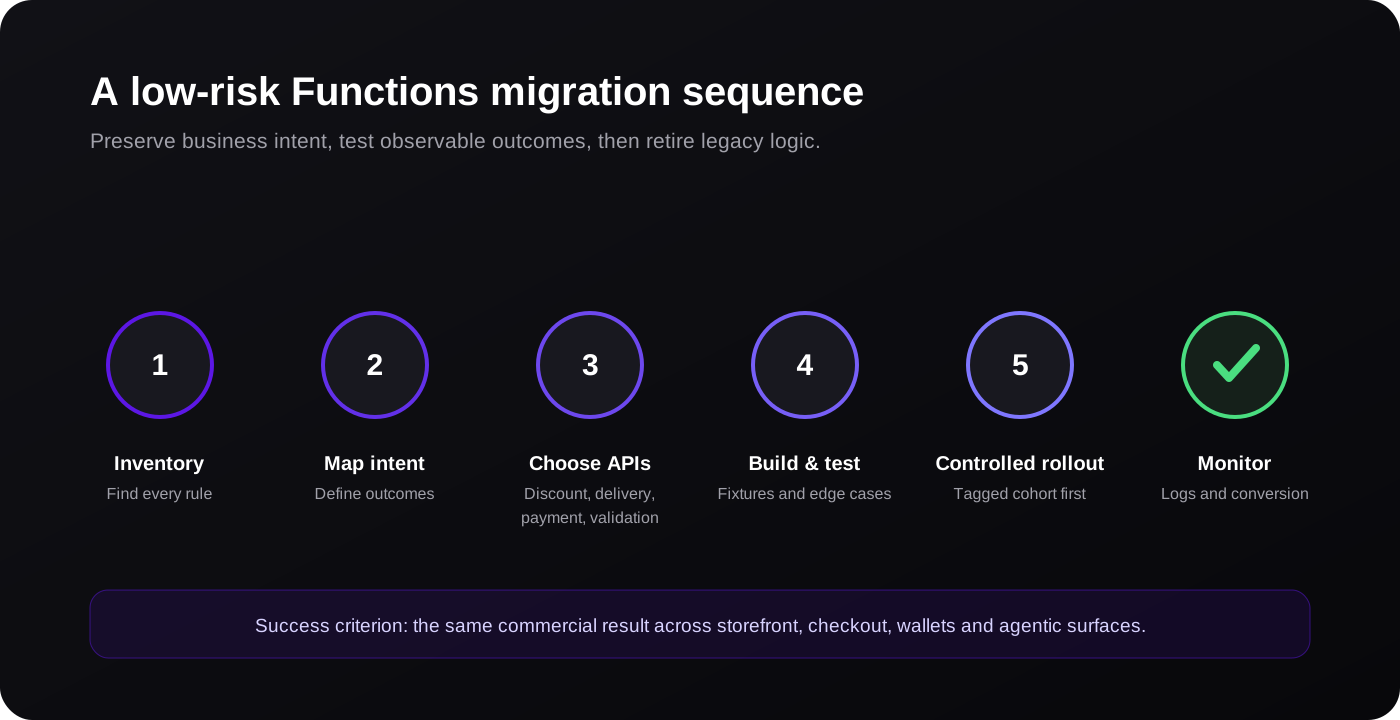
Step 1: Build a complete inventory
Create one record for every Script and every distinct rule inside it. Assign a commercial owner who can confirm what the rule is meant to achieve. Code without an owner should not be migrated automatically; it may protect margin, or it may be obsolete complexity.
Step 2: Write observable acceptance criteria
Convert each rule into testable examples:
- Given a tagged wholesale customer with 20 eligible units, when checkout calculates discounts, then the agreed unit price is applied.
- Given a cart containing an oversized item, when delivery options load for a Canadian address, then express delivery is not offered and standard freight remains available.
- Given a restricted product and an ineligible destination, when the buyer attempts checkout, then progress is blocked with an actionable message.
Acceptance criteria prevent disagreements after launch and become fixtures for automated testing.
Step 3: Select native, app or custom implementation
There are three legitimate paths:
- Native Shopify configuration when current admin features fully satisfy the requirement.
- A public app using Functions when the rule is common and configuration, support and cost are suitable.
- A custom Function app when the logic creates meaningful differentiation, connects to proprietary configuration or requires tighter ownership.
Evaluate total cost rather than development cost alone. An app can be economical but add recurring fees, theme dependencies or configuration limits. Custom code offers control but requires testing, monitoring, API maintenance and documentation.
Step 4: Implement small, deterministic Functions
Request only the input fields required. Keep configuration separate from executable logic, usually in app-owned metafields or the appropriate Shopify resource. Avoid broad queries and deeply nested branching.
Functions should be deterministic: the same input and configuration should produce the same output. When a capability uses network access, design explicit timeouts, caching and fallbacks according to Shopify’s performance and resilience guidance.
Unit tests should cover boundaries, empty data, conflicting discounts, currencies, large carts and malformed configuration. Store fixture inputs and expected outputs in version control.
Step 5: Test in development and a controlled production cohort
Shopify recommends initial testing in a development store, followed by a brief production validation using a tagged customer cohort where appropriate. Confirm the rule through all relevant entry points:
- Standard theme cart and checkout.
- Buy buttons or custom storefront carts.
- Draft or subscription flows where applicable.
- Express wallets.
- B2B customer accounts.
- Agentic or third-party checkout surfaces supported by the implementation.
Check the order record after checkout, not just what appeared on screen. The order is the operational contract used by fulfillment, finance and customer service.
Step 6: Activate, observe and document
Deploy through a controlled release. Record the Function handle, API version, activation resource, configuration owner and rollback approach. Monitor execution errors, discount and shipping economics, conversion, customer complaints and unusual orders.
Document differences from the old Script. A Function may produce the same commercial outcome through different sequencing, messaging or combination behavior. Those differences should be deliberate and communicated.
Common Migration Mistakes
Rebuilding dead logic
Teams often migrate every branch because it exists. Use order data and stakeholder review to determine whether each branch still serves a business need. Deleting obsolete code reduces risk.
Ignoring rule interactions
A discount rarely operates alone. Model native promotions, app discounts, subscription pricing, B2B catalogs, gift cards and free-shipping thresholds together. Test the complete price waterfall.
Testing only the happy path
Production failures happen at boundaries: one cent below a threshold, the maximum quantity, a missing tag, a mixed currency or a split shipment. Boundary tests should outnumber happy-path tests.
Putting presentation logic into the Function
Functions enforce backend outcomes. Theme extensions, checkout UI extensions or app configuration interfaces handle presentation and merchant controls. Keep these responsibilities separate so the rule remains reliable.
Choosing an app without an exit plan
Before installing an app, ask how configuration is exported, what happens if the app is uninstalled, whether Functions remain active, how performance is monitored and who supports API changes.
Emergency Recovery If Revenue Logic Is Broken
If the sunset has already caused customer or margin impact, use a staged response.
- Contain: disable conflicting promotions, simplify checkout settings or temporarily remove an affected offer.
- Communicate: tell customer service, operations and finance what behavior changed and how to handle exceptions.
- Prioritize: restore the few rules with the highest revenue, margin or compliance impact first.
- Validate: run a documented test order for every restored rule.
- Reconcile: identify affected orders and decide whether customers or internal teams require remediation.
- Stabilize: complete the broader inventory so another hidden rule does not surface later.
Avoid rushing an untested custom Function into production merely because the old behavior is missing. A temporary native configuration can be safer while the durable replacement is tested.
How EssDeeJay Can Help
EssDeeJay approaches Scripts migration as a checkout and business-rules program, not a syntax conversion. We can:
- Audit Script Editor, customization reports, installed apps and checkout settings.
- Translate Ruby behavior into plain-language requirements and acceptance tests.
- Identify where native Shopify features or a reputable Function-based app is sufficient.
- Design and build custom discount, delivery, payment or validation Functions.
- Create merchant configuration interfaces and safe defaults.
- Test carts, wallets, markets, B2B accounts and operational order outputs.
- Deploy with observability, documentation and a clear ownership model.
The first useful step is a scoped impact assessment. It tells you what stopped working, which rules still matter, what Shopify now handles natively and which gaps justify custom engineering. That prevents both under-building and expensive reimplementation of logic the business no longer needs.
Frequently Asked Questions
Do Shopify Scripts still work after June 30, 2026?
No. Shopify’s current developer documentation states that Shopify Scripts were sunset on June 30, 2026 and any Scripts still published were deactivated. The Script Editor may remain available temporarily in read-only form to help teams reference old logic.
Can Shopify Functions reproduce every Shopify Script?
Not as a direct one-to-one translation. Many outcomes can be recreated through Discount, Delivery Customization, Payment Customization, Validation and other Function APIs, while some requirements need a different architecture or are now native features. Validate each rule against current API availability and plan requirements.
Are Shopify Functions available on every Shopify plan?
Stores on any plan can use eligible public apps containing Functions, but custom Function apps and some capabilities have plan restrictions. Check Shopify’s current Function API availability before choosing an implementation route.
Should we buy an app or build a custom Shopify Function?
Use an app when the rule is common, the configuration fits and the vendor’s support and ownership model are acceptable. Build custom when the logic differentiates the business, needs proprietary integration, or requires control that available apps cannot provide economically.
How long does a Shopify Scripts migration take?
A simple single-rule replacement may take days. A mature Plus store with multiple interacting Scripts, markets and checkout apps can require several weeks for discovery, development and safe validation. The deciding factor is rule complexity and test coverage, not the number of source-code lines.
Official Resources
Turn insight into a roadmap
Need the right Shopify solution—not another generic recommendation?
We audit the commercial goal, customer journey, platform constraints and existing stack before recommending a build. You get a prioritized plan grounded in impact, effort and maintainability.
Discuss your store